How to Send Crypto to Hundreds of Wallets at Once
A practical guide to bulk crypto transfers on ChainTx.Tools: the four modes, supported networks, how to format the recipient list, what it really costs and how to avoid the mistakes that send money to the wrong place.
 Antonio Vaganovs·Published ·12 min read
Sooner or later almost every active crypto user has to send coins or tokens to a long list of addresses: an airdrop for the community, monthly payouts to contributors, gas money for a few dozen test wallets or trading bots, tokens for the team after a launch. Doing it by hand means hundreds of copy-pastes and wallet confirmations, and every manual step is a chance to make a typo.
A bulk sender (also called a multisender) solves this. You paste the list once, and the tool builds, signs and sends the transfers for you. Below is how it works on ChainTx.Tools, step by step: which mode to choose, how to format the list, what it costs and how to avoid the mistakes that cost real money. Everything described here matches how the tools behave at the time of writing.
The short answer
- Open the One-to-Many bulk sender and pick your network.
- Leave the token field empty to send the native coin (SOL, ETH, BNB, TRX, SUI, TON), or paste the token's address.
- Choose how you sign: on Solana, connect a wallet such as Phantom or use a private key; on the other networks, enter the sending wallet's private key, which signs locally in your browser.
- Pick an amount mode (the same amount for everyone, a random amount or a separate amount per address) and paste the recipients, one per line.
- Click Prepare List, check the summary and the table, then start the run and follow the status of every transfer.
On Solana up to 20 SOL transfers (or 9 token transfers) fit into a single transaction, so 200 SOL recipients take only 10 transactions. On EVM networks, Tron, Sui and TON each recipient gets a separate transaction, and they are sent one after another.
Four modes: which one you need
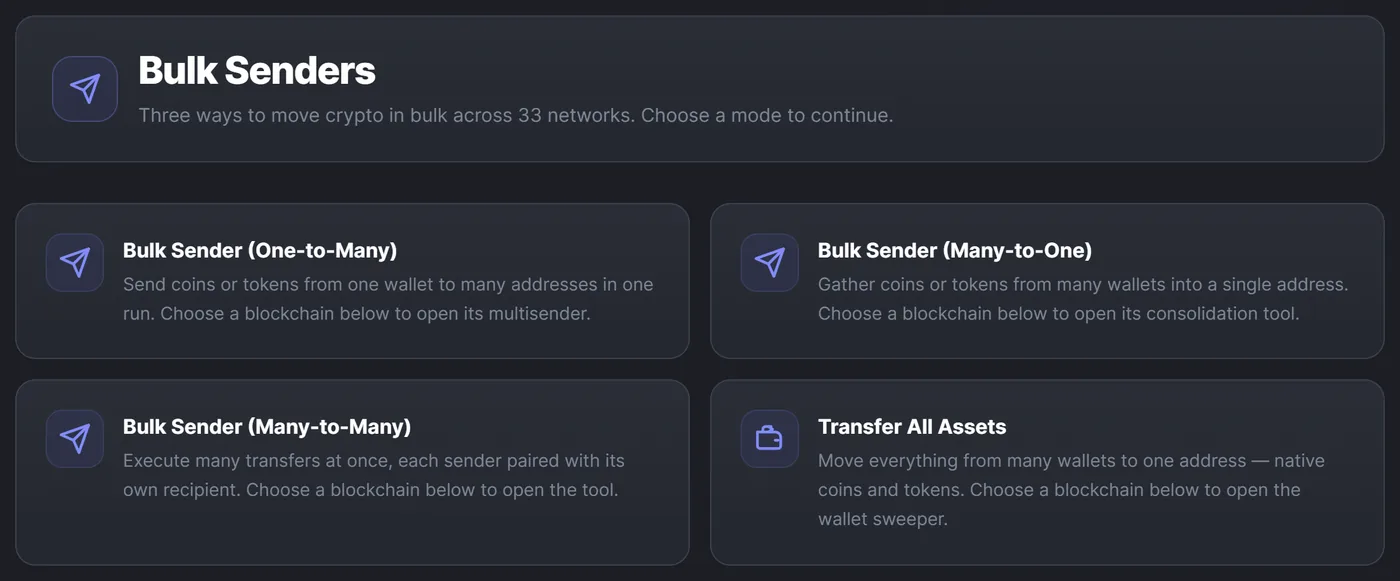
| Mode | Direction | Typical use | What you paste |
|---|---|---|---|
| One-to-Many | One wallet → many addresses | Airdrops, payouts, funding wallets with gas | Recipient addresses, with amounts if needed |
| Many-to-One | Many wallets → one address | Collecting funds after a campaign or a bot session | Source wallet keys + one recipient |
| Many-to-Many | Each wallet → its own recipient | Moving funds between two sets of wallets | Source keys + a list of recipients |
| Transfer All | Everything from many wallets → one address | Closing out wallets, migrating to a new wallet | Source keys + the destination address |
This guide is mostly about One-to-Many, the classic "send to hundreds of wallets" case. The other modes are its mirror images. Many-to-One scans the balances, skips empty wallets and by default sends 100% from each one; a random amount, a random percentage and per-wallet amounts are also available. Many-to-Many pairs senders with recipients in order or randomly; if there are fewer recipients, their list is reused in a loop. Transfer All empties wallets completely: on Solana it finds every SPL and Token-2022 balance by itself, on the other networks you list the token addresses to sweep.
Supported networks
| Network | What you can send | How the sender signs | Page |
|---|---|---|---|
| Solana | SOL, SPL and Token-2022 tokens | Connected wallet (Phantom etc.) or a Base58 private key | Open |
| Ethereum | ETH and ERC-20 tokens | Private key (hex) | Open |
| BNB Smart Chain | BNB and BEP-20 tokens | Private key (hex) | Open |
| Base | ETH and ERC-20 tokens | Private key (hex) | Open |
| Tron | TRX and TRC-20 tokens such as USDT | Private key (hex) | Open |
| Sui | SUI and any Sui coin type | Private key (suiprivkey… or hex) | Open |
| TON | TON and jettons | 24-word mnemonic or hex secret; wallet V5R1 or V4R2 | Open |
Other EVM networks (Arbitrum, Polygon, Avalanche, Optimism and more) work exactly like Ethereum: pick them in the network switcher at the top of any tool page. Every network has its own URL, and the switcher keeps you in the same mode.
Step by step: One-to-Many on Solana
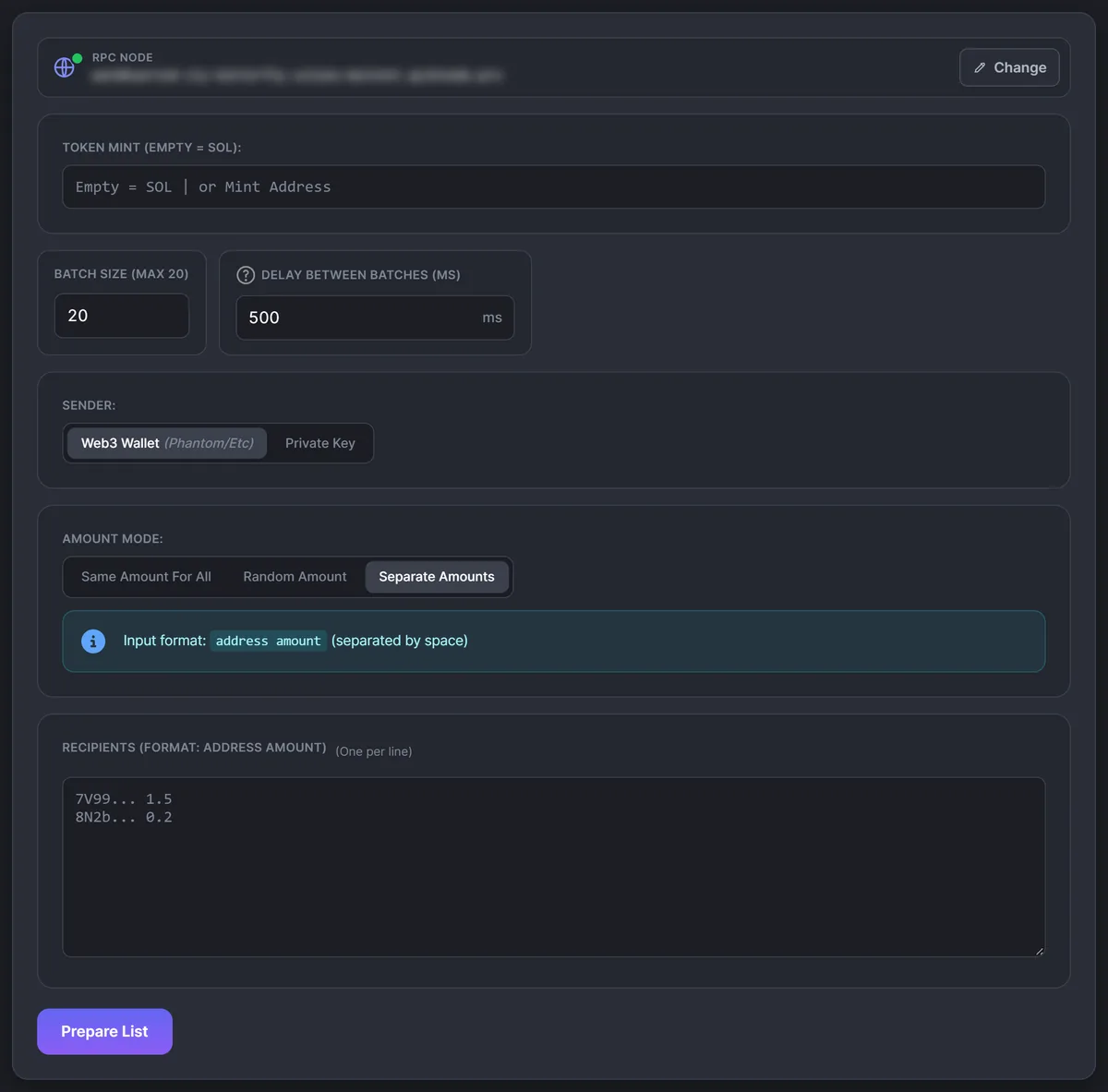
- Open Solana One-to-Many. The RPC node is shown at the top; Change opens the RPC checker, where you can set your own node. For long lists that is worth it, since public endpoints rate-limit quickly.
- Choose the asset. Leave Token Mint empty to send SOL, or paste the token's mint. The tool detects whether it is SPL Token or Token-2022 and reads its decimals, so you enter amounts in normal units (0.5, 100), not in lamports.
- Set the batch size and the delay. One batch is one transaction. Batch Size is 20 by default, which is the maximum for SOL. When you send a token, the field is capped at 9 automatically, because token transfers take more room in a transaction. The delay between batches is 500 ms.
- Pick the sender. Web3 Wallet uses the wallet connected in the site header (Phantom, Solflare and similar) and asks you to approve every batch: 200 recipients at 20 per batch means 10 confirmations. Private Key signs locally with a Base58 key, without pop-ups.
- Choose the amount mode: Same Amount for All, Random Amount (a separate random value between "from" and "to" for each recipient) or Separate Amounts (
address amounton every line). - Paste the recipients, one per line, and click Prepare List.
Check the list before you send
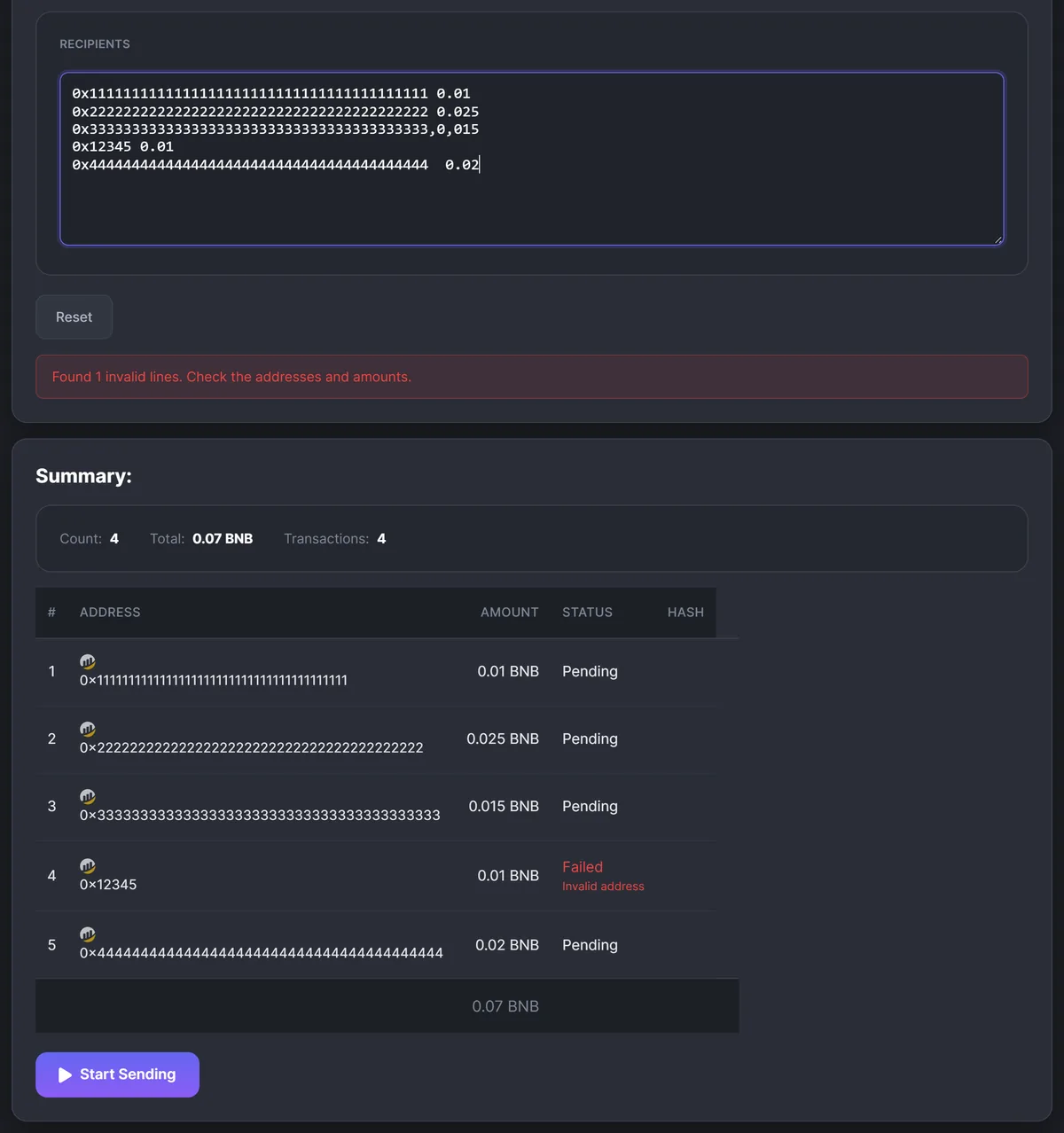
Prepare List doesn't send anything. It parses every line, checks the address format for the selected network and shows a summary: the number of recipients and the total, plus the service fee and the number of batches on Solana or the number of transactions elsewhere. Lines with an invalid address or a zero amount are highlighted in red with the reason; they are skipped and not counted in the totals.
If everything looks right, click Sign & Send (Solana) or Start Sending (other networks). You will see a progress bar, the status of each row, the transaction hash with an explorer link and a running log. Stop halts the run after the current transaction; unprocessed rows stay Pending, and starting again continues with them. Failed rows are not retried automatically: put them into a new list and send it separately.
EVM networks, Tron, Sui and TON
The form is the same, with a few differences:
- the sender is always a private key (on TON, a mnemonic or hex secret plus the wallet version);
- each recipient is a separate transaction, sent strictly one after another; on EVM networks the tool waits for each one to be confirmed before sending the next;
- the default delay is 500 ms on EVM networks, 1 second on Tron and Sui and 2.5 seconds on TON;
- on TON, choose the wallet version you actually use (V5R1 by default, or V4R2): the same key gives different addresses in different versions, and the wrong one points to an empty wallet.
Preparing the recipient list
The list is plain text: one recipient per line, and empty lines are ignored. In the Separate Amounts mode the address and the amount are separated by a space, a tab, a comma or a semicolon:
0x1111111111111111111111111111111111111111 0.05
0x2222222222222222222222222222222222222222 0.125
0x3333333333333333333333333333333333333333,10
Two columns copied from Google Sheets or Excel paste in with a tab between them, so nothing needs reformatting. A CSV in the address,amount form works too, and a header row is skipped automatically.
- Duplicates are not removed. An address that appears twice gets paid twice, so clean the list in your spreadsheet first.
- Validation checks the format, not the owner. A Tron address on BNB Chain or a truncated address is rejected, but the tool cannot know whether an address belongs to the right person.
- Amounts are in normal units (0.5 SOL, 25 USDT); the tool converts them using the token's decimals.
0.5 and 0,5 are both read as half a coin, so you can paste amounts from a spreadsheet in any locale. Just don't use thousands separators: 1,000 is read as 1 and 1.000,5 is flagged as invalid. The only accepted form with a thousands separator is 1,000.5.
If the recipients are your own fresh wallets for testing, bots or farming, create them with the wallet generator, which also covers EVM, Tron, Sui and TON. Keys are generated in your browser; copy them as text or JSON, or click Save to imported keys. Saved keys stay in this browser (see Imported Private Keys), and One-to-Many then offers a Paste N addresses button that fills the list in one click. Many-to-One and Many-to-Many offer Paste N keys in the same way when it is time to collect the funds back.
Fees and speed
You pay the network fee and, on some tools and networks, a ChainTx.Tools service fee.
- Solana. Each batch is one transaction with one signature, and the base fee is 5,000 lamports per signature (0.000005 SOL); the tool adds no priority fee. When you send tokens, a recipient without a token account gets one created in the same transaction, and the sender pays its rent, about 0.002 SOL per new account.
- EVM networks. Every recipient is a separate transaction. A plain coin transfer uses 21,000 gas, a token transfer more, so the same list costs very different amounts on Ethereum and on an L2.
- Tron. TRX transfers use bandwidth and TRC-20 transfers use energy; without staked resources the cost is covered by burning TRX. The tool caps each token transfer with a 100 TRX fee limit.
- Sui and TON. Each transfer is its own transaction paid in SUI or TON. A jetton transfer carries 0.1 TON for forwarding, and the unused part returns to the sender.
The service fee at the time of writing:
| Tool | Networks | Service fee |
|---|---|---|
| One-to-Many | Solana | 0.001 SOL per recipient, inside each batch transaction |
| One-to-Many | EVM, Tron, Sui, TON | None |
| Many-to-One, Many-to-Many | Solana | 0.001 SOL per source wallet, paid by the first wallet |
| Many-to-One, Many-to-Many | EVM | 0.0001 of the native coin per source wallet, paid by the first wallet |
| Many-to-One, Many-to-Many | Tron, Sui, TON | None |
| Transfer All | Solana | 0.0001 SOL per wallet |
| Transfer All | EVM, Tron, Sui, TON | None |
On Solana the fee appears in the summary before you sign. For example, 200 SOL recipients with a batch size of 20 means 10 transactions, 0.00005 SOL in base network fees and 0.2 SOL in service fees.
As for speed, Solana waits for each batch to be confirmed, pauses for the delay and sends the next one. On EVM networks a run takes roughly "number of recipients × (confirmation time + delay)", and on TON the default 2.5-second delay alone makes 200 transfers last more than 8 minutes. If the RPC starts returning rate-limit errors, increase the delay or use your own node.
Safety: how not to lose money
Before sending to hundreds of addresses, run the same settings on 2–3 addresses you control, check the result in an explorer, and only then load the full list.
- Take addresses from the source (a form, a spreadsheet, a snapshot), never from your transaction history. Address poisoning relies on that habit: scammers send tiny transfers from addresses that start and end like your real counterparties, hoping you will copy the fake one.
- Use a separate wallet for the distribution with only the amount to send plus a fee reserve, not your main wallet's key. On Solana you can skip keys entirely by connecting Phantom.
- Keep a reserve of the native coin. Even token transfers pay fees in SOL, ETH, BNB, TRX, SUI or TON; on Solana add the service fee and token account rent, on TON 0.1 TON per jetton transfer.
- Don't send to exchange deposits that need a memo. The bulk sender doesn't attach a comment (memo or tag), and on TON many exchanges require one.
- Keep the tab open. The process runs in your browser: closing or reloading the page stops it, and the table is lost. Check the explorer before sending again, so that nobody gets paid twice.
A key entered on these pages signs transactions in the browser; only signed transactions leave the page, through the RPC node you selected. Keys saved with "Save to imported keys" stay in this browser, encrypted with a key that is stored in the same browser, so anyone with access to that browser profile can use them.
Common mistakes
- Thousands separators in amounts:
1,000is read as 1. - Duplicates in the list: the same person is paid twice.
- No native coin for fees: USDT on Tron without TRX or ERC-20 tokens without ETH fail on the first transfer.
- The wrong TON wallet version, which derives a different, empty address.
- Re-running the whole list after a partial failure instead of sending only to the failed rows.
After the send: checking the result
The bulk balance checker is the natural last step. Paste the same recipient list (with the token address if you sent a token) and you see every balance at once. If the wallets were empty before, Copy empty addresses gives you exactly those that still hold nothing: a ready list for a corrective run. To gather funds from your own wallets back into one, use Many-to-One or Transfer All.
Summary
Sending crypto to hundreds of wallets takes a few minutes of preparation: pick the mode and the network, paste a clean list, check the summary, run a small test and then the full batch. On Solana transfers are packed up to 20 per transaction (up to 9 for tokens); on EVM networks, Tron, Sui and TON they go one by one. The costly mistakes are almost always in the list itself, such as a duplicate, a wrong address or a thousands separator, so spend your attention there, keep a reserve for fees and use a dedicated wallet for the distribution.
FAQ
+How many addresses can I send to in one run?
The tools have no fixed limit on the list. On Solana up to 20 SOL transfers (or up to 9 token transfers) are packed into one transaction; on EVM networks, Tron, Sui and TON every recipient is a separate transaction. Long lists simply take longer, so keep the browser tab open until the run finishes.
+Do I have to enter my private key?
On Solana you can connect a wallet such as Phantom and approve each batch instead of entering a key. On EVM networks, Tron, Sui and TON the sender is a private key or mnemonic, which is used in the browser to sign the transactions. Use a separate wallet that holds only the amount to distribute plus a reserve for fees.
+How much does a bulk send cost?
You always pay the network fees. At the time of writing, One-to-Many on Solana also charges a service fee of 0.001 SOL per recipient, shown in the summary before you sign, while One-to-Many on EVM networks, Tron, Sui and TON has no service fee.
+Can I send a different amount to each address?
Yes. Choose the Separate Amounts mode and put the address and the amount on each line, separated by a space, a tab, a comma or a semicolon. Both 0.5 and 0,5 work as amounts; just don't use thousands separators. There is also a mode with one amount for everyone and a mode with a random amount within a range.
+Can I send tokens such as USDT, not only the native coin?
Yes. Paste the token address: SPL or Token-2022 mints on Solana, ERC-20 or BEP-20 contracts on EVM networks, TRC-20 on Tron, a coin type on Sui or a jetton master on TON. The wallet still needs the native coin to pay the network fees.
+What happens if some transfers fail?
Failed rows are marked in the table and the run continues with the rest. They are not retried automatically, so collect the failed addresses into a new list and send it separately instead of re-running the whole list.
+What if I close the page in the middle of a run?
The process runs in your browser tab, so it stops. Transfers that were already sent stay on-chain, but the table is lost. Check the recipients in an explorer or with the bulk balance checker before sending again, so that nobody is paid twice.